High-clarity seal recognition
PRODUCTS
-

- PRODUCTS
- 스캐너·하드웨어
스캐너·하드웨어
Products
Providing Good Products
and Services
Bonsys delivers customer value
through differentiated technology.
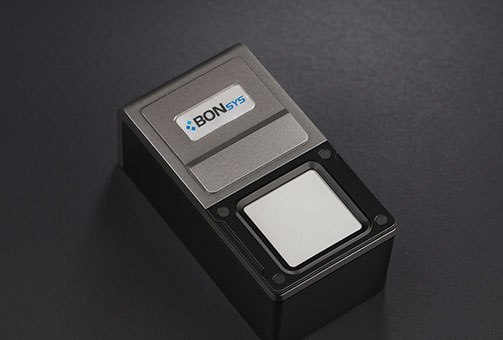
Seal (Official Stamp) Scanner
An electronic counter scanner based on a 500 DPI high-resolution sensor,
capable of accurately and reliably recognizing various seals and official stamp images.
Optimized for public offices, financial institutions, and corporate service counters,
it delivers high recognition quality and operational reliability.
- Clear recognition quality
- Stable operation in diverse environments
- Easy maintenance
What is a Seal (Official Stamp) Scanner?
A PPR (Paperless & Process Reengineering)–based electronic document processing scanner
developed to improve the efficiency of electronic service counters.
By enhancing complex counter environments and automating the electronic recognition
of seal and official stamp images, it improves processing speed and user convenience.
Designed to meet the accuracy, stability, and maintenance requirements of financial
institutions and public offices, this solution is optimized for the deployment
and expansion of electronic counter systems.
Model No. BS10
Residual ink removal
Function
Standard seal size for public offices & enterprises
Approx. 30 mm
Stable wired connection
USB 2.0 / DC 5V
Twin driver support
Windows / Android
B/W
16/256 Gray
24-bit Color
Supported
Compact size
55 × 105 × 45 mm
Model No. BS1
Scannable regardless
of seal material
- Scans seals made of plastic, rubber, or wood without limitation
- Generates optimal images by producing accurate output
Designed for financial
service counters
- Stable structure prevents shaking during seal stamping
- Even with ink residue, the built-in cleaning pad unit enables 1:1 ratio scanning, optimized for customer service requirements
Specifications
| Model | BS1 | BS10 |
|---|---|---|
| Sensing Area | 30 × 30 mm or larger | |
| Resolution | 100, 200, 300, 400, 500 dpi | |
| B/W, 16/256 Gray, 24-bit Color | ||
| Interface | USB 2.0 or higher | |
| Power Supply | USB bus power | |
| Scan Quality | Clear and accurate images / residual ink removal | |
| Scan Method | Stamping on upper scanner pad | |
| Scan Target | Various types of seals (official stamps) | |
| Scan Speed | Within 3 seconds | |
| Driver | TWAIN, MS Windows 10/11 (32-bit, 64-bit) | |
| Android 5.0 or higher | ||
| Compatibility | Compatible with electronic form solutions | |
| Seal Pad | Composite pad (White) | Composite pad (Red) |
| Office Environment | Size (W × H × D): 54 × 44 × 105 mm | Size (W × H × D): 57 × 24 × 100 mm |
| Weight: 190 g | Weight: 167 g | |
Seal (Official Stamp) Scanner Consumables
- 1 Seal recognition pad
- 2 Dedicated cleaner
Fingerprint Scanner
An electronic identification device for identity verification that precisely
captures and analyzes fingerprints.
It can be applied to various security systems, including personal authentication,
access control, and integrated service counters.
- High-precision fingerprint recognition
- Compatible with various systems
- Stable structure and certified reliability
What is a Fingerprint Scanner?
A biometric identification device that rapidly analyzes the unique patterns
of fingerprints to verify personal identity.
Due to its high level of security, it is widely used for identity verification
in various environments such as bank counters, public offices, access control
systems, and unmanned terminals.
The GFDU40 delivers stable recognition performance and broad system compatibility,
making it optimized for secure operational environments.
High-precision sensor
500 DPI
High-speed interface
USB 2.0
Windows · Linux
Supports multiple OS environments
KC · UL · CE · FCC safety standards
Certified stability and reliability
ID Card Scanner
A device that scans ID cards—such as resident registration cards
and driver’s licenses—into high-resolution images
and automatically reads embedded data.
- Fast image scanning performance
- Supports multiple document and image formats
- Stable USB 2.0–based connectivity
What is an ID Card Scanner?
An automatic ID recognition device used in unmanned services,
service counters, and distribution environments.
It accurately and quickly reads identification information
from ID cards such as resident registration cards and driver’s licenses
through high-quality image scanning.
The device supports image storage formats including BMP, JPEG, and TIFF,
and can be easily integrated into various systems via USB 2.0.
Scan Engine
500 DPI
Supported Formats
BMP
JPEG
TIFF
High-speed Interface
USB 2.0
Windows XP / Vista / Windows 7, etc.
Supports Multiple OS Environments
Braille Display
An assistive braille output display device for visually impaired users that
instantly converts on-screen information into braille.
It enhances accessibility when used with kiosks, unmanned civil service machines,
and business terminals.
- Real-time braille output
- Supports integration with various kiosks
- Stable and intuitive usability
What is a Braille Display?
A device that outputs information displayed on digital screens—such as kiosks
and civil document issuing machines—into braille, allowing visually impaired users
to read the content immediately.
Most models connect via USB and are essential for strengthening accessibility
in public service environments.
Braille cell configuration
20-cell / 8-cell models available
High-speed interface
USB 2.0
Integration Support
Computer & Kiosk /
Accessible Systems
Braille translation SDK, H/W controller
SDK / Control support
20-cell braille display
B20N
8-cell braille display
B08N
Braille Keypad
An assistive braille input device for visually impaired users that provides
accurate braille input and audible beep feedback
when used with kiosks and unmanned terminals, enhancing overall accessibility.
- Accurate braille input support
- Compatible with various terminals
- Easy maintenance
What is a Braille Keypad?
An assistive device designed to allow visually impaired users to input text
in braille on kiosks and civil service terminals.
Audible beep feedback confirms each button press, making it an essential
accessibility device in public-service environments where accurate input is required.
- 24-Key Keypad
- 12-Key Keypad
- 6-Key Keypad
Specifications
| Category | BPAD-6K | BPAD-12K | BPAD-24K |
|---|---|---|---|
| Key Pad | 6 keys | 12 keys | 24 keys |
| Key Pad Configuration | 4-direction, confirm, cancel | Numeric (0–9), confirm, cancel | Includes start, edit, English, consonant/vowel keys |
| Braille Standard | Compliant with Korean Braille standards | ||
| Interface | USB 2.0 or higher | ||
| Power Supply | USB bus power input: DC 5V, 1A | ||
| Material | Stainless steel | ||
| Maximum Operating Frequency | Below 108 MHz | ||
| I/O Port | 5-pin port | ||
| Size (W × H × D) | 115 × 16 × 70 mm | 130 × 23 × 90 mm | 206 × 23 × 90 mm |
| Weight | 170 g | 280 g | 440 g |
Products Compliant with Korean Braille Standards
|
Korean Braille Standards (Ministry of Culture, Sports and Tourism Notice No. 2020-38, Sept. 10, 2020) |
|
|---|---|
| Dot Height | Min. 0.6 mm ~ Max. 0.9 mm |
| Dot Diameter | Min. 1.5 mm ~ Max. 1.6 mm |
| Dot Spacing (Center-to-center) |
Min. 2.3 mm ~ Max. 2.5 mm |
| Character Spacing | Paper / Sticker: Min. 5.5 mm ~ Max. 6.9 mm |
| PVC: Min. 5.5 mm ~ Max. 7.3 mm | |
| Aluminum / Stainless Steel: Min. 5.5 mm ~ Max. 7.6 mm | |
| Other materials: Applied according to the above standards | |
| Line Spacing | Min. 10.0 mm ~ No maximum limit |
| Braille Standard Example |
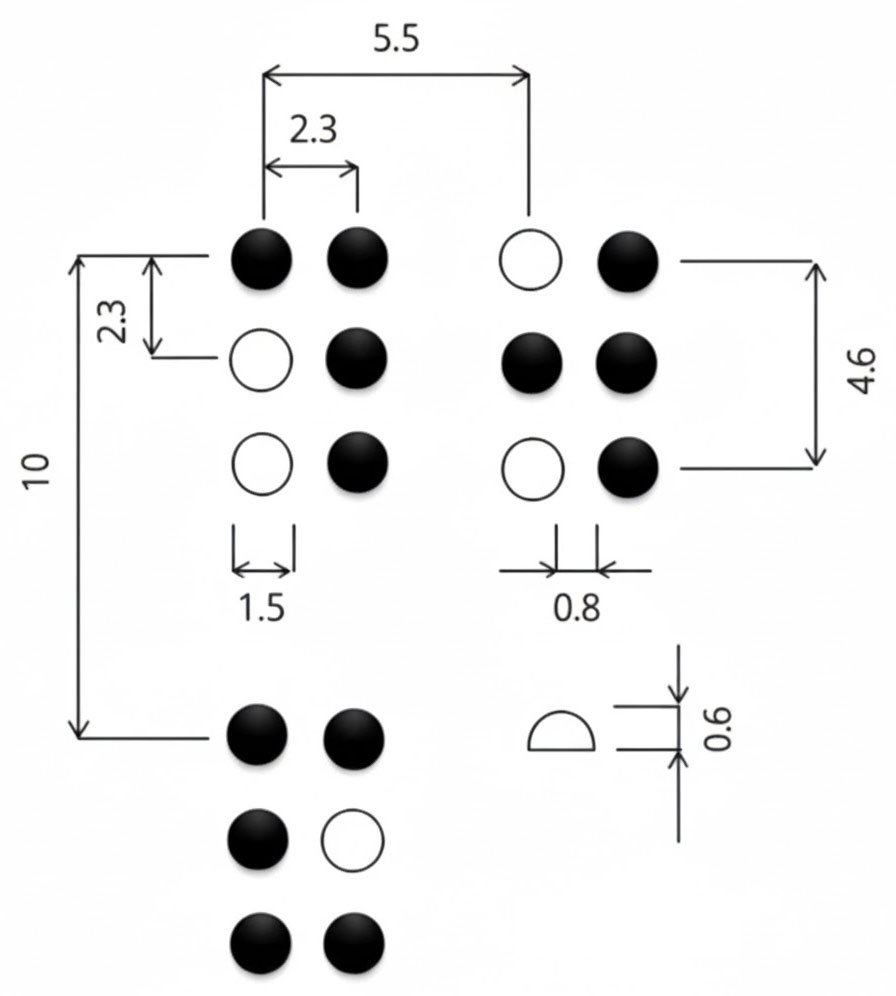 (Unit: mm)
|
Barrier-Free Kiosk
Headphone Volume Controller
Dedicated accessibility hardware designed to allow individual volume control
for headphones used on kiosks by visually and hearing-impaired users.
It ensures that all users can receive audio guidance at an appropriate volume
suited to their needs.
- Accessible volume control
- Stable volume regulation
- Kiosk-compatible design
What is a Headphone Volume Controller?
A dedicated hardware device provided to allow users who require auditory assistance
to freely adjust headphone output volume when using kiosks.
In addition to headphone volume control, it can automatically switch and manage
external speaker output depending on the situation, making it an essential component
for enhancing accessibility in public kiosks.
BON-VC02
Analog knob
Easy volume control
Auto speaker output
Speaker switching
Auto detection
Headphone
detection
USB power
DC 5V
Audio output
120 dB-90 dB
Reliable circuit
Stable PCB
Terminal support
Kiosk compatible
Plug & play